

Free AI tools keep changing: what Google’s Gemini update means for you
Last checked: 27 October 2026
If you use a free AI assistant for your work, the tool you use today may not behave the same way next month. A recent change to Google’s free Gemini shows why, and what a small business owner or student can do about it.
What changed
According to a report from Business Today dated 5 October 2026, Google is changing which models people can use in the Gemini app, depending on their plan:
- Free users (no paid plan): from 9 October, only the lightest model, Gemini Flash-Lite.
- AI Plus subscribers: lose the strongest model (Pro) but keep Flash-Lite and Flash. Google was reported to be emailing these users with their date.
- AI Pro and AI Ultra subscribers: no reduction was mentioned.
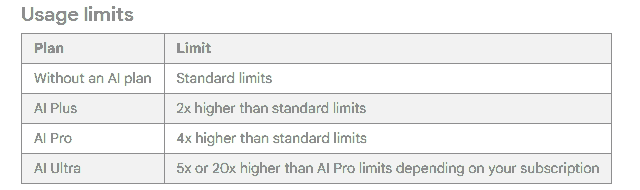
Google’s own usage limits page says free users get “Standard limits”, paid plans get more, and “limits may change without notice”. We could not find an official Google announcement of the model change itself, so treat the model names as reported, not confirmed. Check the Gemini app to see what you actually have.
What this means for you
A lighter model can still write a polite customer reply or tidy a list. It is more likely to miss detail or make mistakes on harder jobs, such as long documents or messy notes. That is one more reason to check every result yourself. It is also a reminder that free tools are free on the company’s terms, and those terms change.
What to do this week
- Keep your facts list in your own file. Your prices, hours and policies should live in a note or document you own, not only inside one AI chat. Our guide on drafting customer replies shows how to build one. Then you can paste them into any assistant.
- Save the prompts that work. A prompt that works in one assistant usually works in another with small changes. Keep a copy, as in our guide to turning a repeated task into a reusable template.
- Do not depend on one tool for something a customer is waiting for. Have a second free assistant you have tried at least once.
- Re-test after a change. If your results suddenly get worse, check whether the tool changed, and repeat your usual check on a few examples.
Related on this site
- How to choose a free AI assistant: five questions and a 20-minute test
- Assistant, wrapper app or agent: which do you need?
- AI in plain words (glossary)
The bottom line
You do not need the newest or strongest model for everyday admin. You do need a way of working that survives a tool changing. That means your own facts, your own saved prompts, and you checking the result every time.
Sources: Business Today, 5 October 2026 (reported change); Google Gemini help: usage limits (official; limits vary by plan and may change). We did not test the Gemini change ourselves.