


Read a Contract With AI: 6 Safe Steps Before You Sign
Home › Blog › Read a Contract With AI: 6 Safe Steps Before You Sign
Last checked: 8 November 2026
Before you sign anything, you can read a contract with AI alongside your own reading, not instead of it. This guide covers what AI can realistically do with an agreement, six things worth asking it to check, and where it can be wrong.
What AI can do when you read a contract
According to OpenAI’s “Uploading files and audio to ChatGPT” help page, ChatGPT can take an uploaded document and summarize it, compare it with another document, or answer questions about its contents. Anthropic’s “Upload files to Claude” help page describes the same kind of work for Claude: upload a PDF, DOCX, or TXT file (up to 500MB and 1,000 pages in a chat, as of 23 July 2026) and ask about what it says.
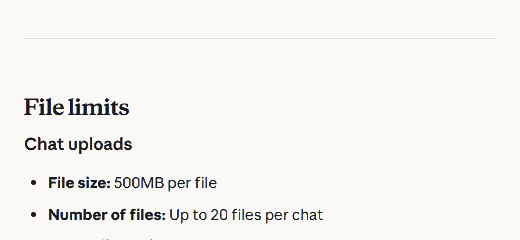
Screenshot: Anthropic, “Upload files to Claude” help page, support.claude.com, dated 23 July 2026.
Both pages describe general document tools, not a legal-review feature. Neither company’s help pages claim their assistant gives legal advice, and this brief does not either.
Six things to ask AI to check in any agreement
- Who can end it, and how. Ask: “Can either side cancel this, and what notice does each side need to give?” One-sided termination rights are common and easy to miss.
- Auto-renewal. Ask: “Does this renew automatically, and how far ahead must I cancel to stop it?” A short cancellation window buried in a long paragraph is a frequent trap.
- Who pays if something goes wrong. Ask: “Does this make me responsible for claims that are not clearly my fault?” This is often called an indemnity clause.
- Where disputes get settled. Ask: “If we disagree, whose courts or rules apply, and is that convenient for me?”
- Fees and price changes. Ask: “Can the price change during the agreement, and how would I be told?”
- What happens to shared information. Ask: “What does this say about using or keeping my data or files after the agreement ends?”
Tested by us: a worked example
Tested by us with Claude on 8 November 2026. We wrote a short made-up clause and asked Claude to flag anything worth a second look:
“The Provider may terminate this agreement at any time, with notice given at the Provider’s discretion. The Client agrees to indemnify and hold harmless the Provider against any and all claims arising from the Client’s use of the service. This agreement renews automatically every 12 months unless the Client cancels in writing at least 60 days before the renewal date. Any dispute will be resolved exclusively in the courts located in the Provider’s registered jurisdiction.”
Claude correctly flagged four points: the termination right only clearly favors the Provider; the indemnity clause is broad and not limited to the Client’s own fault; the 60-day cancellation window for auto-renewal is easy to miss; and disputes must go to the Provider’s own courts, which may be costly or inconvenient for the Client. This matches what a careful human read would also catch — the value here was speed, not a finding a careful reader couldn’t make. Other assistants may word their answers differently; this was not tested with ChatGPT or Gemini.
What to do this week
- Before signing anything with real terms, upload it to an assistant and ask the six questions above, one at a time.
- Read the original clause the assistant points to yourself, not just its summary. Quote-check it against the source document.
- If a clause is unclear or the agreement matters financially or legally, have a qualified person who can give actual legal advice look at it before you sign.
- Keep the six checks for an AI answer open in another tab while you do this.
What can go wrong
AI can miss a clause, misread a cross-reference between sections, or summarize confidently even when it is unsure. It does not know your jurisdiction’s specific laws unless you tell it, and even then it is not a substitute for a qualified person. If you upload a document that contains private details — your name, a client’s name, financial figures — read the safe steps for summarising a report first. Keep the glossary and Start Here page nearby if a term here is new to you.
Sources: OpenAI, “Uploading files and audio to ChatGPT” help page, help.openai.com, updated recently as of this check (supports what ChatGPT can do with an uploaded document). Anthropic, “Upload files to Claude” help page, support.claude.com, dated 23 July 2026 (supports file types and size limits, and what Claude can do with an uploaded document). The worked example was run by us with Claude on 8 November 2026 and is not from either help page. Last checked 8 November 2026.